ZATCA e‑invoicing that plugs into the system you already run.

FinTax connects your ERP or POS to the Fatoora platform. Every invoice is checked, turned into a compliant PDF/A‑3 with its XML embedded, and sent to ZATCA. Your team keeps working the way it does today.

  • Works with Fatoora Phase 2
  • Fully hosted in Saudi Arabia
  • Cloud or on-premises
Tax invoice فاتورة ضريبية
Invoice no.INV-2026-0047188 Nov 2026, 13:24
Seller
Sample Trading Co.
VAT 399999999900003
Buyer
Example Retail Est.
VAT 300000000000003
ItemQtyAmount (SAR)
Office chair2900.00
Printer toner4480.00
Annual maintenance11,200.00
ZATCA QR code for this sample invoice
Subtotal2,580.00
VAT 15%387.00
Total (SAR)2,967.00
  • Seller and buyer VAT numbers are valid
  • Line totals and 15% VAT add up
  • Linked to the previous invoice's hash
  • XML embedded in PDF/A‑3, QR code added
  • Sent to ZATCA and cleared

Whatever your system, we connect.

No matter what you use to issue invoices, FinTax connects it to ZATCA. Guaranteed.

  • Microsoft Dynamics 365
  • Odoo
  • Sage
  • Xero
  • Your ERP or POS

These are some of the systems we connect with. If yours isn't listed, tell us what you run and we'll show you how it connects.

From your system to Fatoora

FinTax sits between the system that creates your invoices and ZATCA. You don't have to replace anything or retrain anyone.

  1. Connect your system

    We integrate with the ERP or POS where your invoices are already created, without disrupting your daily workflow.

  2. Check every invoice

    Smart data validations catch wrong VAT numbers, totals and missing fields before anything reaches ZATCA.

  3. Generate and sign

    Each invoice becomes a PDF/A‑3 document with its XML embedded, a QR code and a cryptographic stamp.

  4. Clear or report with ZATCA

    Standard invoices go to Fatoora for clearance and simplified invoices are reported. The result comes back to your system.

What FinTax handles for you

Save time and money: integration takes little effort on your side, and the compliance work runs in the background.

PDF/A‑3 invoices with embedded XML
PDF/A‑3 keeps invoices readable and preserved for the long term. The embedded XML stores the invoice data in a structured format that's easy to process.
Smart data validation
Checks run on every invoice so that what you send to ZATCA has no errors.
Built for volume
Processes millions of transactions within minutes.
Online and offline POS
Supports point-of-sale operations whether a branch is online or offline.
Cloud or on-premises
Run FinTax on our cloud or on your own servers.
Fully hosted in Saudi Arabia
On our cloud, every invoice is processed and stored on servers inside the Kingdom.
Technical support and full services
Our team supports you through integration, go-live and day-to-day operation.

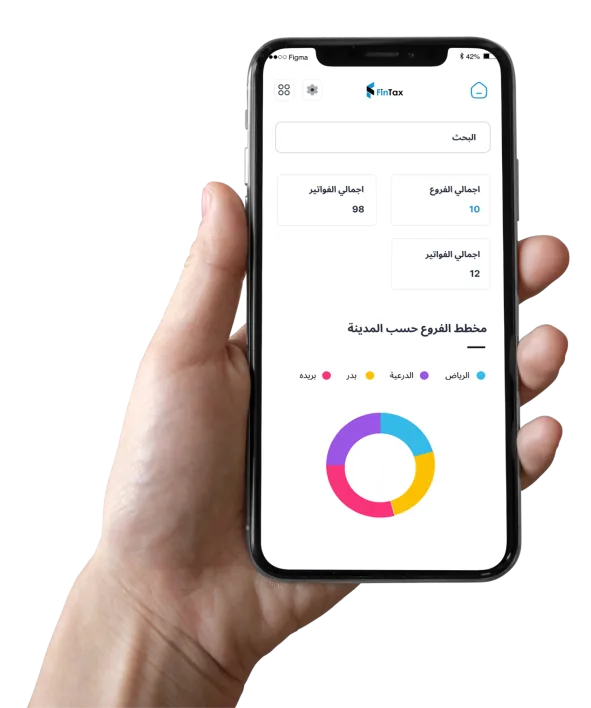
Every branch and invoice in one app

The FinTax mobile app gives finance teams a live view across the business.

  • Total branches and total invoices at a glance
  • Branches broken down by city
  • Search across your invoices
The FinTax app on a phone, showing total branches, total invoices and a chart of branches by city

Book a demo

Tell us which system you use and how many invoices you issue. We'll show you FinTax working with a setup like yours.

Already a customer?
Sign in to the FinTax portal

We use your details only to arrange the demo. See our privacy policy.